
What Laminate does.
Laminate is access control and credentialing for events and sites, on iPads and iPhones. Here is what it does, in the order you would use it.
Beside the features that touch personal details or access, a short note says what that means for privacy and control.
Plan the site
Lay out the areas you look after, and decide who gets into each, and when.
-
Zones
Each area you look after becomes a zone, each gate is set to watch one zone, and you can place the zones on an uploaded plan of the site.
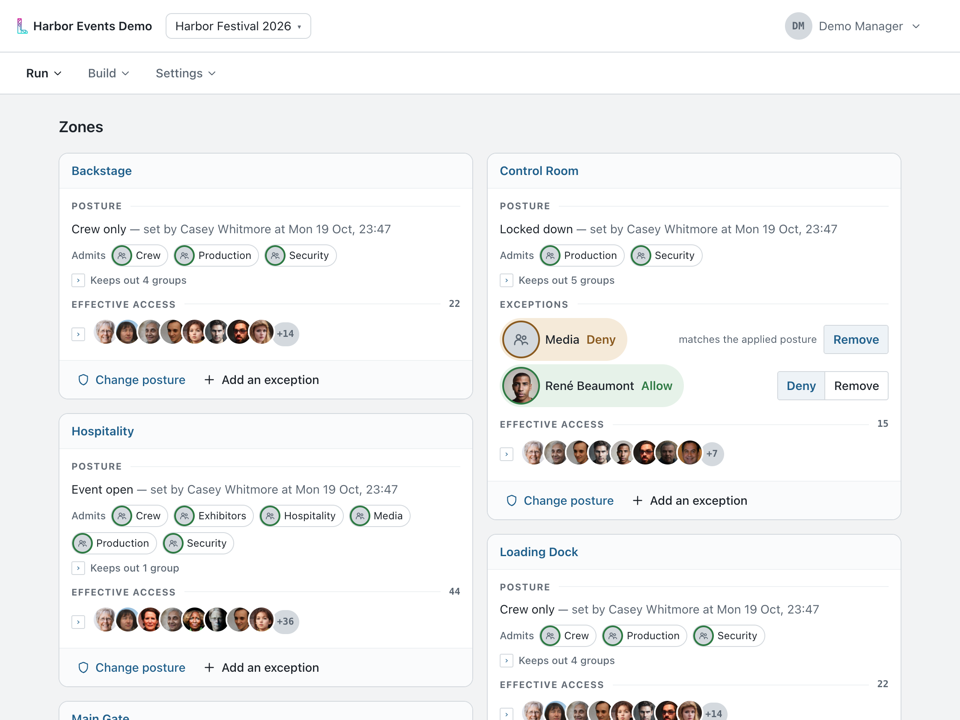
Run, then Zones: every zone of the event on a card of its own. -
Postures
A posture is a zone’s rule for who gets in, such as crew only or locked down, and a change can be scheduled for a set time, to apply on its own or to ask you first.
-
Who a change affects
Before you change a posture, Laminate shows you who the change will affect.
Privacy and control: Each posture switch and exception is kept as a signed record of who made it, and when.
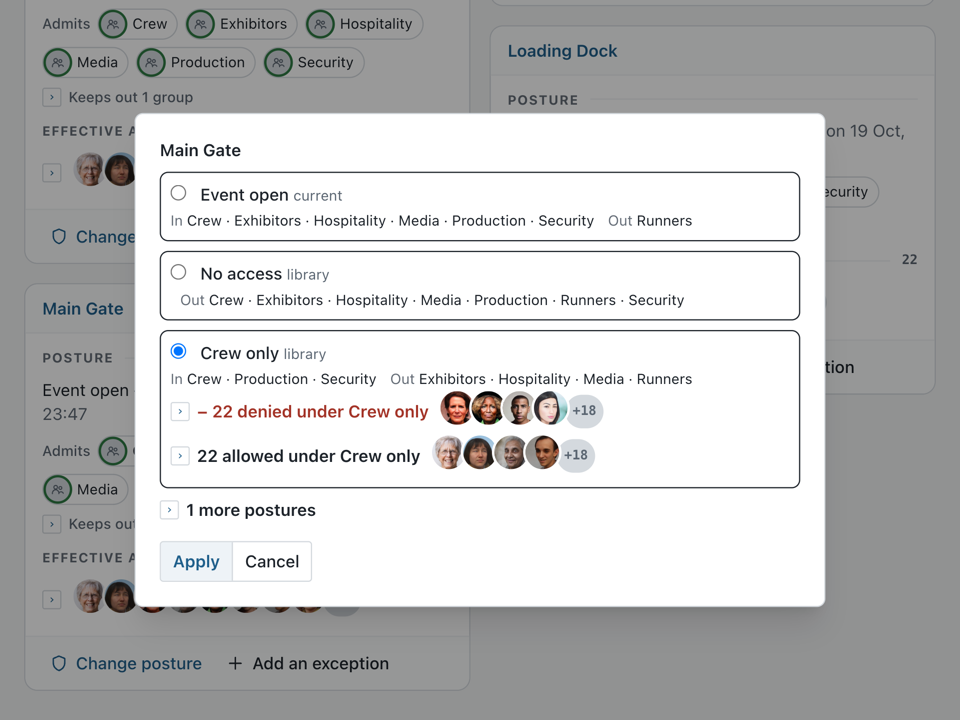
Choosing Crew only for the main gate: before anything is applied, the sheet counts who the new posture would deny and who it would allow, and shows their faces. -
Exceptions
Allow or deny one group or one person at a zone, on top of its posture, until the posture next changes.
-
Several projects at once
Run more than one project at a time, each with its own people, zones and devices.
Privacy and control: Each project’s records are kept apart by the database, under a key of its own.


Enroll your people
Bring in the people you expect from the sheet you already keep, and let each one complete their own enrollment, with consent asked first.
-
Groups, companies and the people list
Put people in groups, such as crew or security, note the company each one works for, and find anyone in one searchable list; postures admit groups.
-
Your roster
Connect a Google Sheet and Laminate reads it again every hour, or bring people in from a CSV or Excel (.xlsx) file.
Privacy and control: To connect a sheet, you share it with Laminate’s own Google address, which sees only what is shared with it.
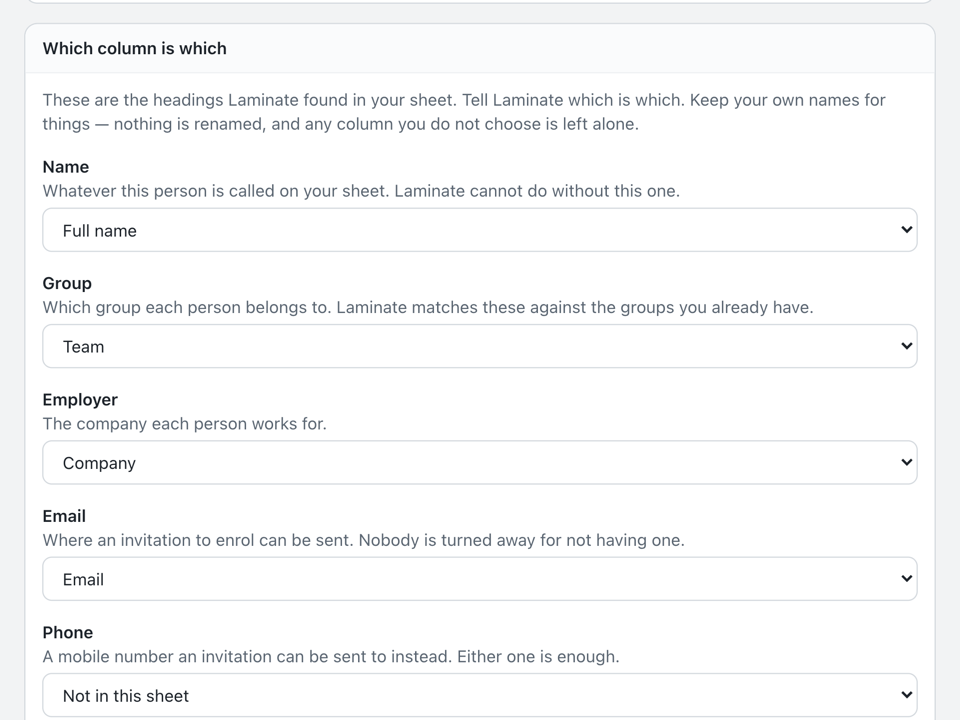
Reading a roster file: you say which of your own columns holds the name, group, company and email, and your headings stay as they are. -
Photos
Photos can come from a shared Google Drive folder, or from a zip or folder of photos sent in through a photo import the assistant starts, and are matched to people by name.
Privacy and control: You share just the one folder, and an uploaded batch changes nobody until you review it and apply it.
-
Requirements and waivers
Ask each group for what you need, as text, dates, files, signatures, photos or ID documents, and waive a requirement for one person.
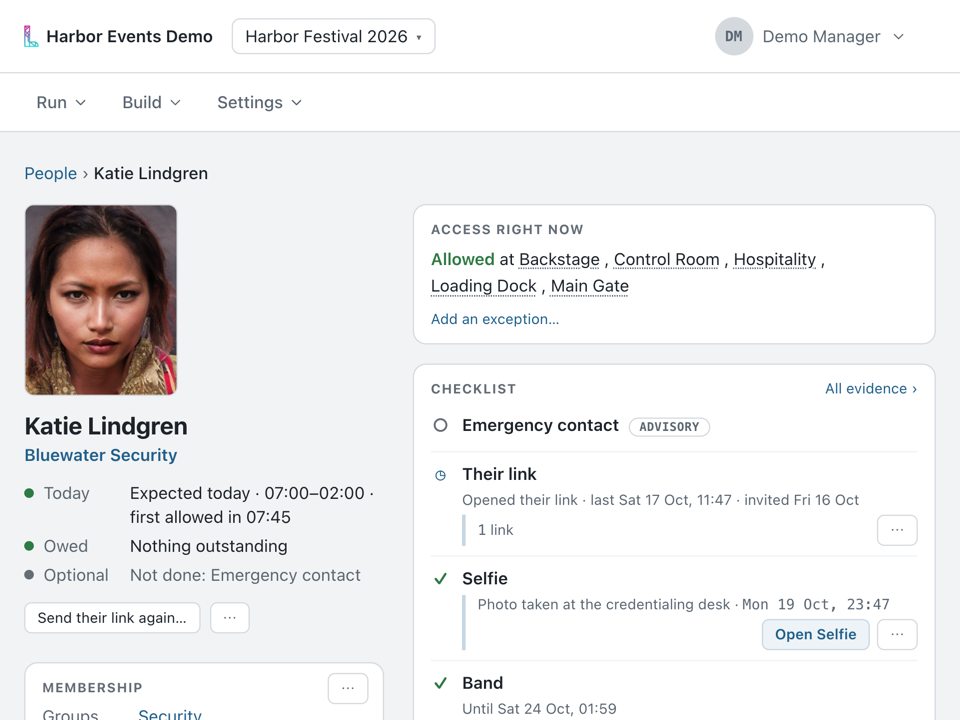
One person’s page: nothing owed, where they can go right now, and their checklist, each item with what it records, such as a selfie taken at the credentialing desk. -
The enrollment link
Each person gets a link of their own, by email or as a code shown at the desk, to complete their enrollment and sign agreements on their own phone, or they sign on an iPad at the desk.
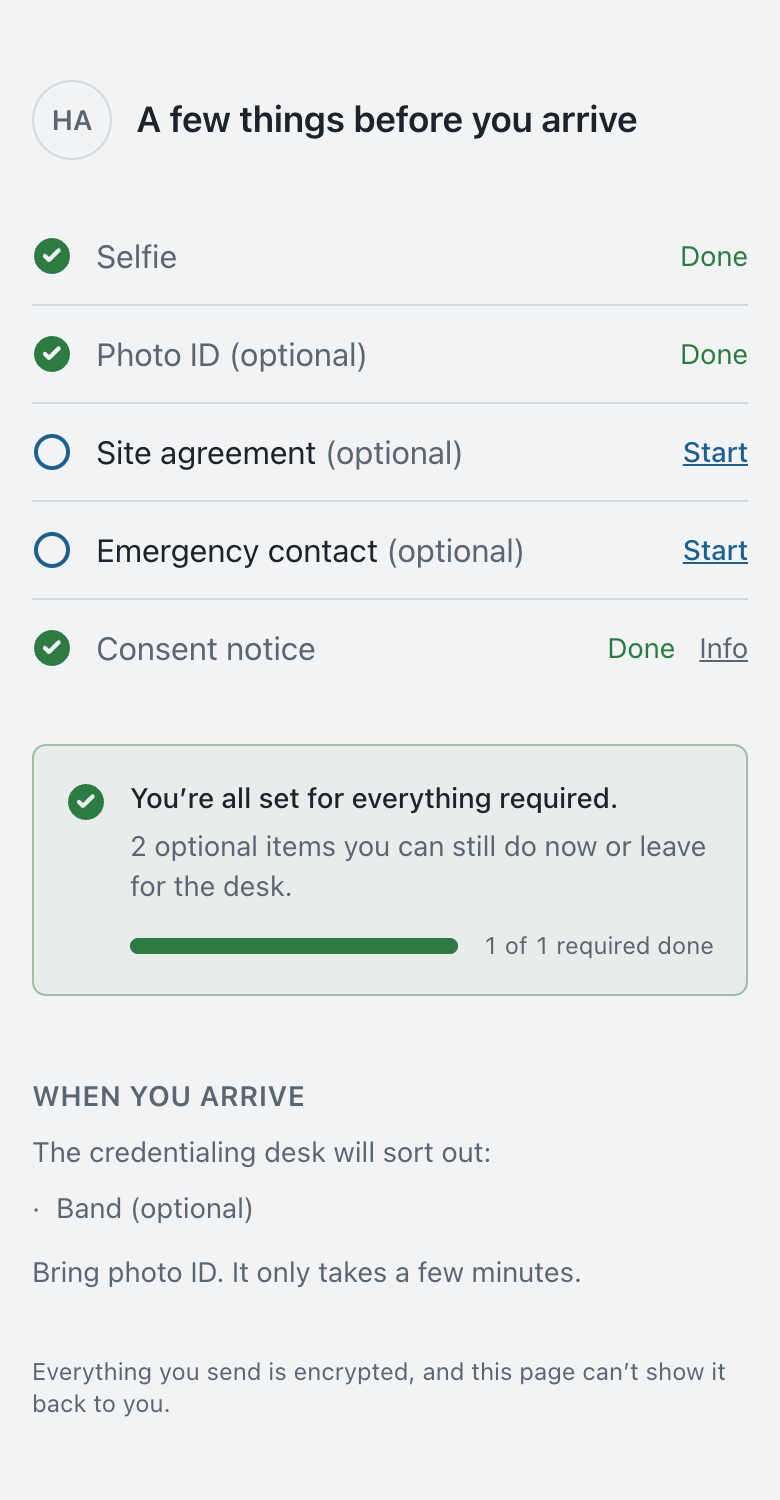
What a person sees when they open their own link: what is done, what is left to do, and what the desk will finish when they arrive. -
An ID check, if you want one
An ID check runs through Didit, Stripe Identity or Laminate’s own check, which reads the document and compares its photo with the person’s face.
Privacy and control: Laminate deletes the ID details it holds seven days after the person’s last scheduled day by default, and records each time they are opened.
-
Consent first
A face is learned only after the person has been shown what face recognition involves and said yes, and they can say Not now at the desk or leave it undone on their sign-up link.
Privacy and control: Where wristbands are issued, a person who declines is identified by their wristband instead, and anyone who agreed can withdraw later.
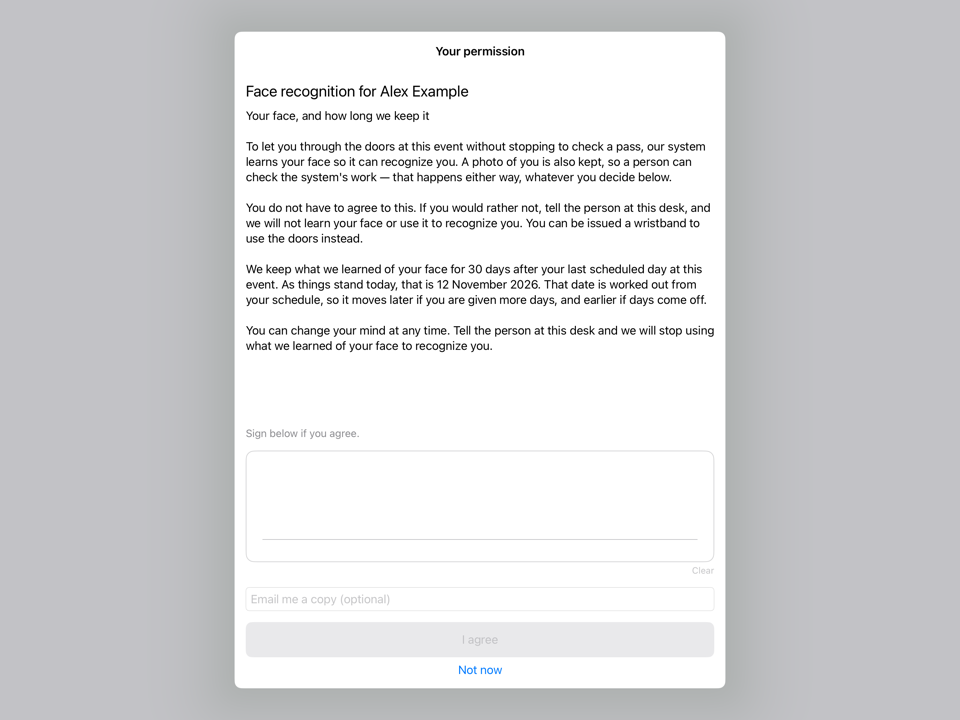
The notice at the desk, shown on the iPad before a face is learned.


Check people at the gate
On iPads and iPhones, Laminate supports the person at the gate. It shows what it knows, and the person decides.
-
Portal
On an iPad at an entrance, Portal shows green for someone who is expected and orange for someone who needs a second look, never a red screen, and can pair with an optional, supported Neewer light to light faces.
Privacy and control: Laminate does not open or lock doors; it informs, and it helps the person at the gate decide.
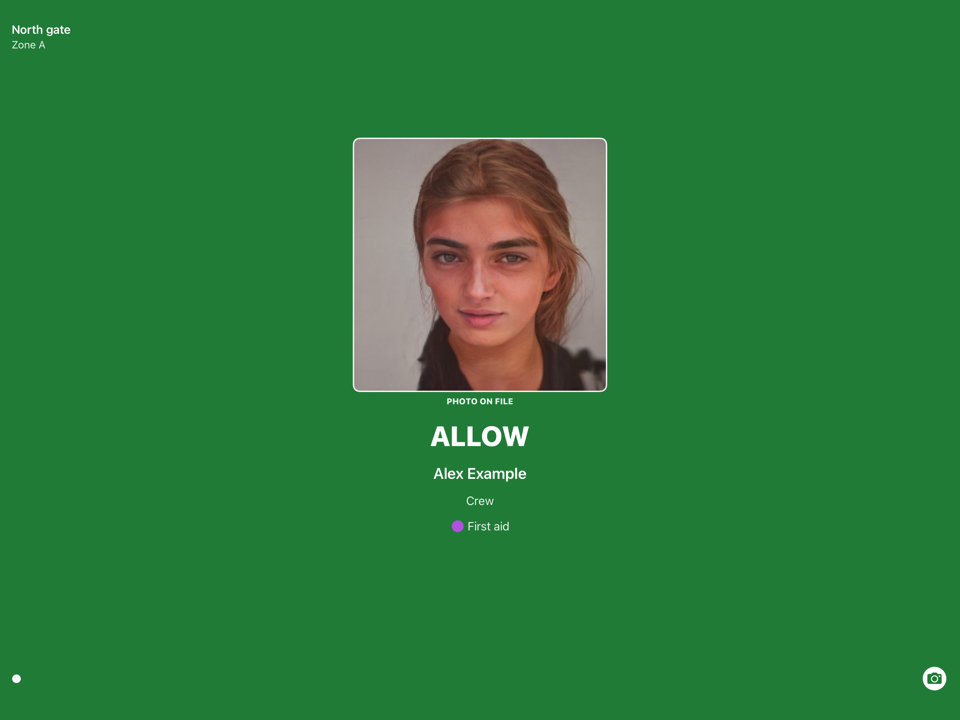
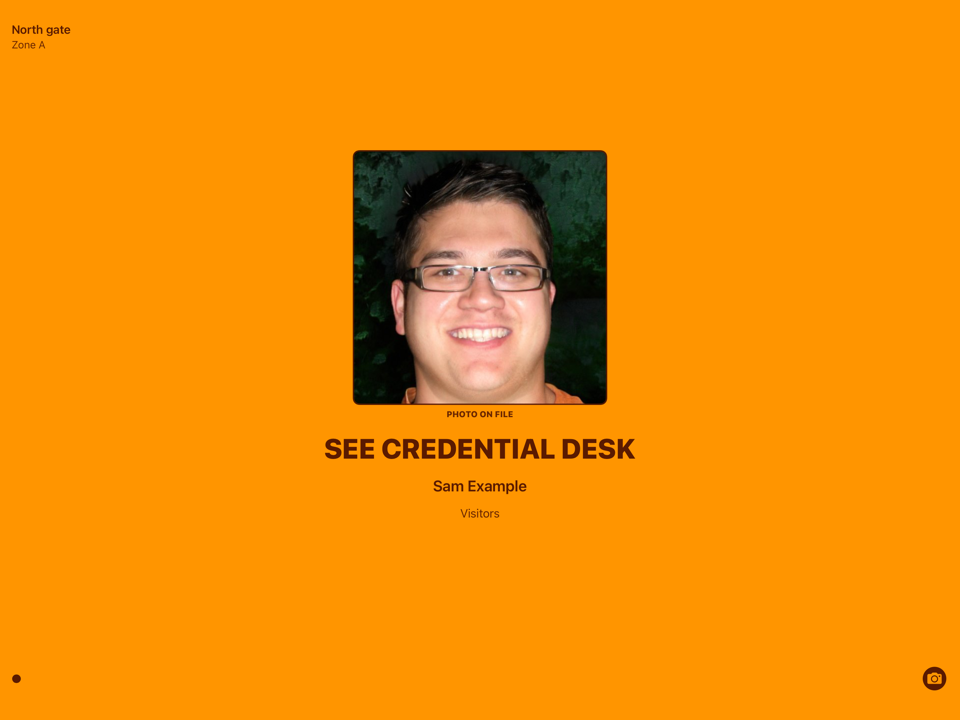
Green for someone who is expected, orange for someone who needs a second look, each with the photo on file beside the name. -
Scanner
Carried by someone on your team, Scanner puts a name to a face and shows whether that person is on today’s list.
-
Badging desk
At the credentialing desk, staff sign in with their own PIN to take photos, capture signatures and ID, and issue wristbands.
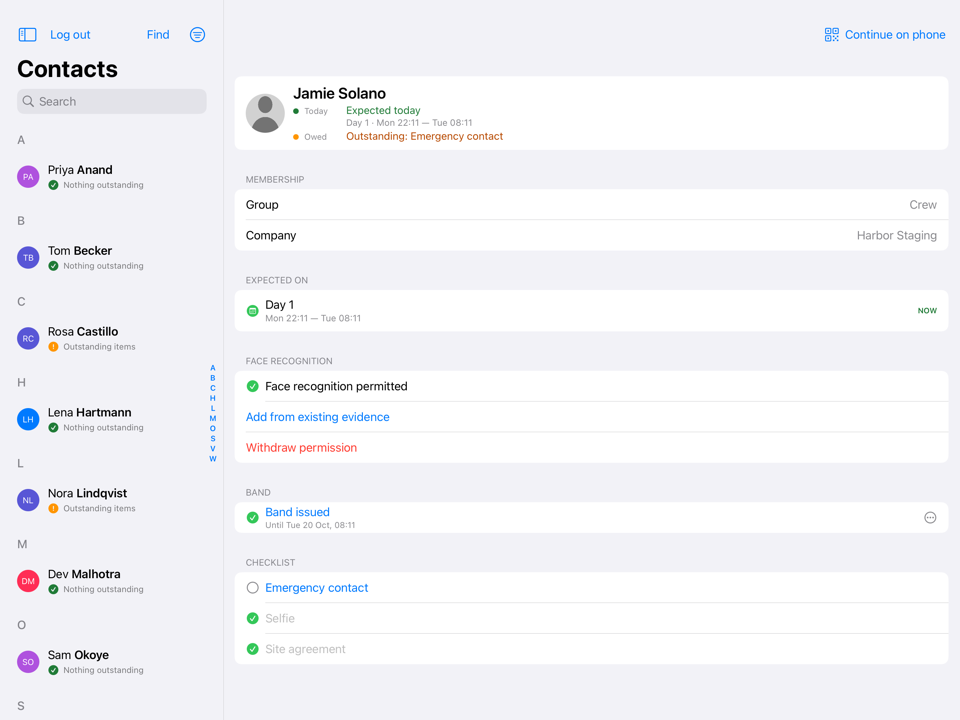
The desk’s contact list beside one person: their day, what they still owe, their consent, their wristband and their checklist. -
Face matching on the device
Faces are matched on the iPad or iPhone itself, so a check does not wait on the network and keeps working offline; a face it does not recognize is not a verdict, and where wristbands are in use the screen asks for a tap instead.
Privacy and control: For a person invited to enroll, face data is created only while their consent is active, and the device keeps what it holds encrypted.
-
Wristbands
NTAG424 DNA wristbands are read by an iPhone’s own NFC or by an iPad’s paired Bluetooth reader, and each tap is cryptographically verified on the device.
Privacy and control: A wristband holds no name or photo, only identifiers.


Run the day
See the day as it happens, and change course when plans change.
-
The Feed
The Feed shows who was admitted and who was referred, where and when, and from a referral you can put the person on today’s list or give them access.
Privacy and control: Each check at a door or desk is recorded, with who it was, when, and on which device.
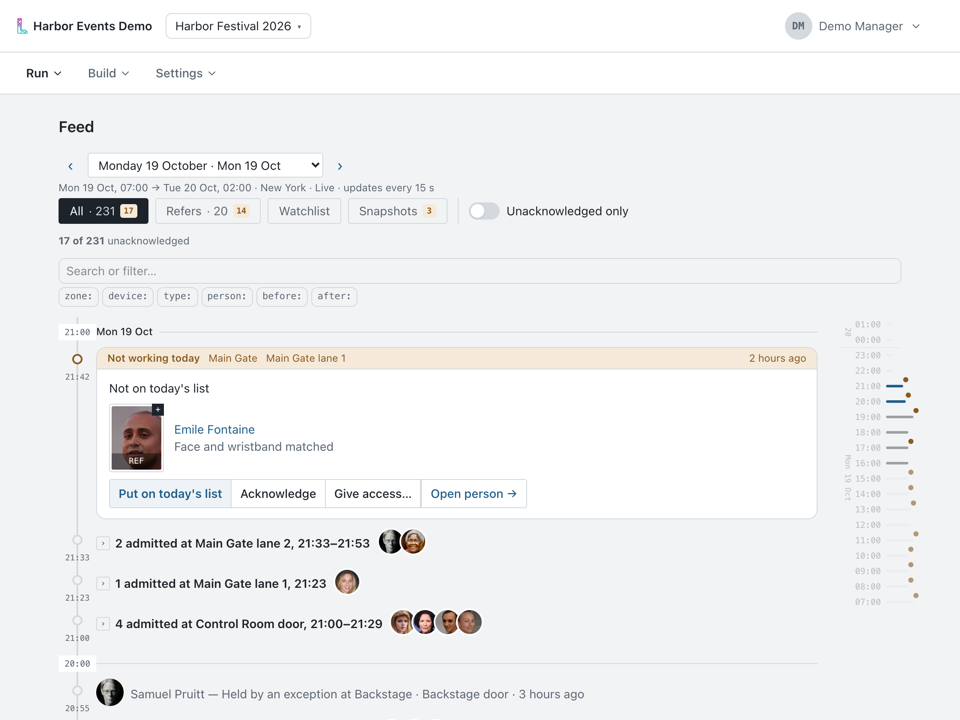
The Feed on a running day: a referral at the main gate, then the people admitted at each door. -
Change course
When plans change, switch a zone’s posture from its card, which also lists its exceptions and who it lets in, and extend or revoke a person’s wristband from their page in the console.
-
Review
Before the day starts, Review looks over your setup and points out what is worth fixing.
Privacy and control: Review only advises; it changes nothing on its own.
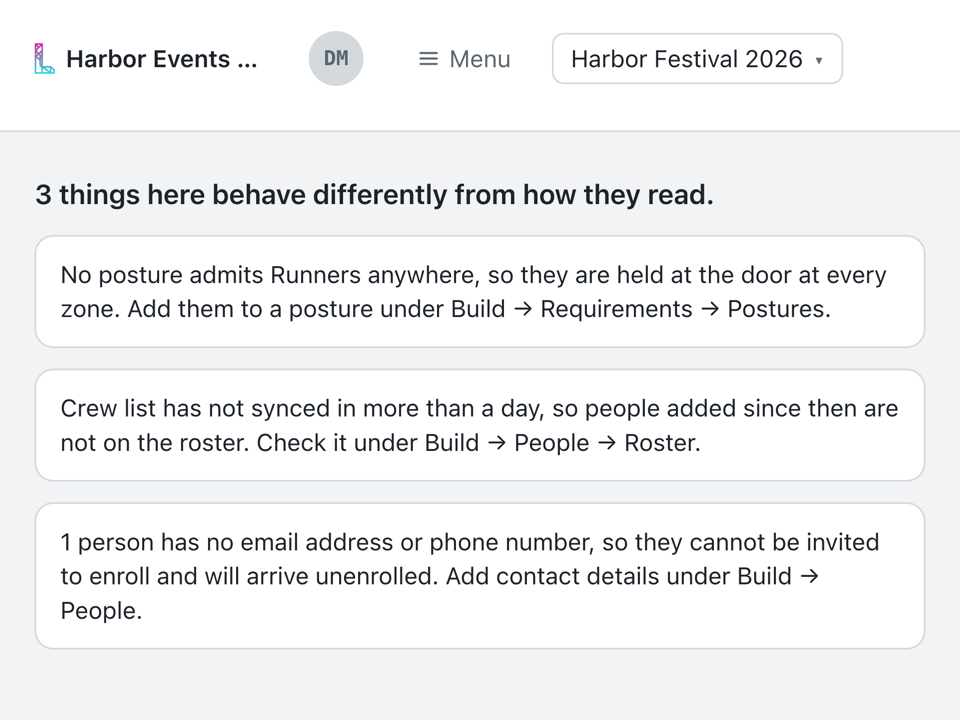
Review on a setup with three things worth fixing: a group no posture lets in, a roster that has gone quiet, and a person with no way to be sent their link. -
Your own watchlist
Your organization can keep a watchlist of its own.
Privacy and control: Devices match against it only after someone at your organization has recorded the lawful basis for doing so.


Connect what you already use
Laminate fits around the tools your team already works in.
-
The sheet you already keep
Connect a Google Sheet and keep working in it: Laminate writes each person’s enrollment status, and whether they have been seen on site, back into columns of its own.
-
Passkeys and single sign-on
Your team signs in to the console with a passkey, or through your organization’s own single sign-on.
Privacy and control: There is no password sign-in to the console, and desk staff use a PIN of their own at the station.
-
Your assistant
Connect the assistant you already use, such as Claude or ChatGPT, to find people, check who can get in where and make everyday changes, with a preview first when you want one.
Privacy and control: Laminate never gives it photos, face data, ID document numbers, signatures, wristband identifiers or watchlists; making changes is a separate permission you choose, and every change it makes is recorded.